Docker环境搭建
Docker安装
系统: Centos7
安装依赖库
yum install -y yum-utils device-mapper-persistent-data lvm2
安装docker仓库
sudo yum-config-manager --add-repo https://download.docker.com/linux/centos/docker-ce.repo
更新yum包索引
yum makecache fast
安装最新版本的Docker CE
yum install docker-ce
Docker版本查看
[root@localhost opt]# docker version
Client: Docker Engine - Community
 Version:           20.10.5
 API version:       1.41
 Go version:        go1.13.15
 Git commit:        55c4c88
 Built:             Tue Mar  2 20:33:55 2021
 OS/Arch:           linux/amd64
 Context:           default
 Experimental:      true

Server: Docker Engine - Community
 Engine:
  Version:          20.10.5
  API version:      1.41 (minimum version 1.12)
  Go version:       go1.13.15
  Git commit:       363e9a8
  Built:            Tue Mar  2 20:32:17 2021
  OS/Arch:          linux/amd64
  Experimental:     false
 containerd:
  Version:          1.4.3
  GitCommit:        269548fa27e0089a8b8278fc4fc781d7f65a939b
 runc:
  Version:          1.0.0-rc92
  GitCommit:        ff819c7e9184c13b7c2607fe6c30ae19403a7aff
 docker-init:
  Version:          0.19.0
  GitCommit:        de40ad0
[root@localhost opt]#
Docker卸载
[root@localhost ~]# yum remove docker docker-common docker-selinux docker-engine docker-ce-cli
Loaded plugins: fastestmirror, langpacks
No Match for argument: docker
No Match for argument: docker-common
No Match for argument: docker-engine
Resolving Dependencies
--> Running transaction check
---> Package container-selinux.noarch 2:2.119.2-1.911c772.el7_8 will be erased
--> Processing Dependency: container-selinux >= 2:2.74 for package: containerd.io-1.4.4-3.1.el7.x86_64
--> Processing Dependency: container-selinux >= 2:2.74 for package: 3:docker-ce-20.10.5-3.el7.x86_64
--> Running transaction check
---> Package containerd.io.x86_64 0:1.4.4-3.1.el7 will be erased
---> Package docker-ce.x86_64 3:20.10.5-3.el7 will be erased
--> Processing Dependency: docker-ce for package: docker-ce-rootless-extras-20.10.5-3.el7.x86_64
--> Running transaction check
---> Package docker-ce-rootless-extras.x86_64 0:20.10.5-3.el7 will be erased
--> Finished Dependency Resolution
extras/7/x86_64                                                                                                                              | 2.9 kB  00:00:00
mysql-connectors-community/x86_64                                                                                                            | 2.6 kB  00:00:00
mysql-tools-community/x86_64                                                                                                                 | 2.6 kB  00:00:00
mysql56-community/x86_64                                                                                                                     | 2.6 kB  00:00:00
nux-dextop/x86_64                                                                                                                            | 2.9 kB  00:00:01
updates/7/x86_64                                                                                                                             | 2.9 kB  00:00:00

Dependencies Resolved

====================================================================================================================================================================
 Package                                       Arch                       Version                                       Repository                             Size
====================================================================================================================================================================
Removing:
 container-selinux                             noarch                     2:2.119.2-1.911c772.el7_8                     @extras                                41 k
Removing for dependencies:
 containerd.io                                 x86_64                     1.4.4-3.1.el7                                 @docker-ce-stable                     128 M
 docker-ce                                     x86_64                     3:20.10.5-3.el7                               @docker-ce-stable                     115 M
 docker-ce-rootless-extras                     x86_64                     20.10.5-3.el7                                 @docker-ce-stable                      24 M

Transaction Summary
====================================================================================================================================================================
Remove  1 Package (+3 Dependent packages)

Installed size: 268 M
Is this ok [y/N]: y
Downloading packages:
Running transaction check
Running transaction test
Transaction test succeeded
Running transaction
  Erasing    : docker-ce-rootless-extras-20.10.5-3.el7.x86_64                                                                                                   1/4
  Erasing    : 3:docker-ce-20.10.5-3.el7.x86_64                                                                                                                 2/4
  Erasing    : containerd.io-1.4.4-3.1.el7.x86_64                                                                                                               3/4
  Erasing    : 2:container-selinux-2.119.2-1.911c772.el7_8.noarch                                                                                               4/4
  Verifying  : containerd.io-1.4.4-3.1.el7.x86_64                                                                                                               1/4
  Verifying  : 3:docker-ce-20.10.5-3.el7.x86_64                                                                                                                 2/4
  Verifying  : docker-ce-rootless-extras-20.10.5-3.el7.x86_64                                                                                                   3/4
  Verifying  : 2:container-selinux-2.119.2-1.911c772.el7_8.noarch                                                                                               4/4

Removed:
  container-selinux.noarch 2:2.119.2-1.911c772.el7_8

Dependency Removed:
  containerd.io.x86_64 0:1.4.4-3.1.el7               docker-ce.x86_64 3:20.10.5-3.el7               docker-ce-rootless-extras.x86_64 0:20.10.5-3.el7

Complete!
[root@localhost ~]# rm -rf /var/lib/docker
[root@localhost ~]# rm -f /etc/docker/daemon.json
[root@localhost ~]# rm -f /usr/lib/systemd/system/docker.service
Docker配置
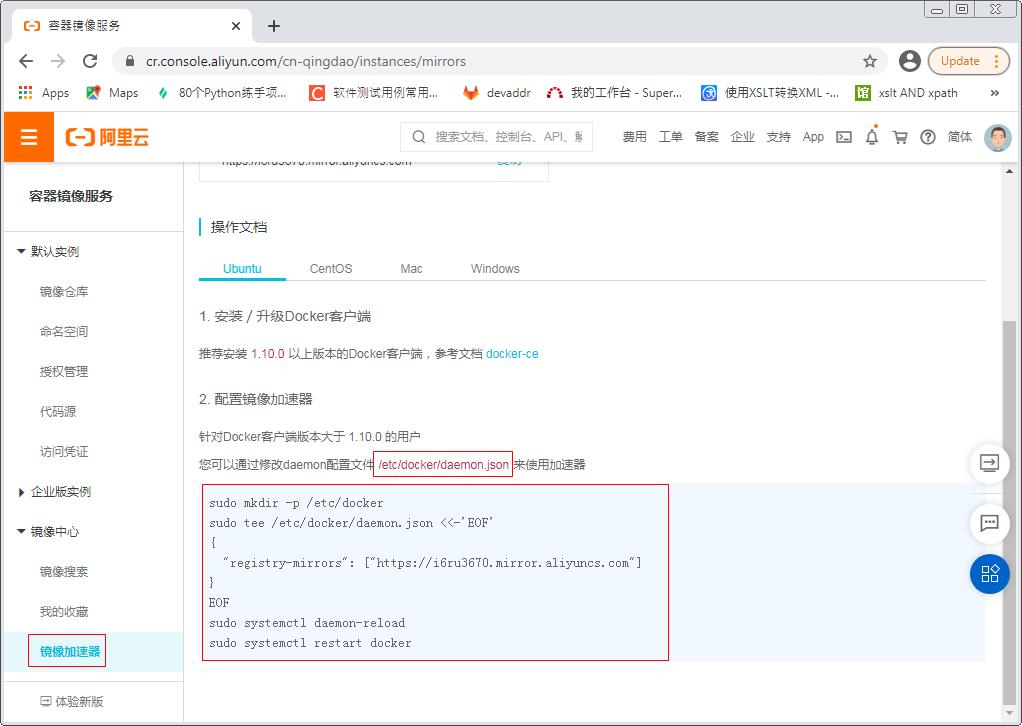
加速器配置: 阿里云为例, https://cr.console.aliyun.com/cn-qingdao/instances/mirrors
下载镜像: 以Jenkins镜像为例
镜像搜索:
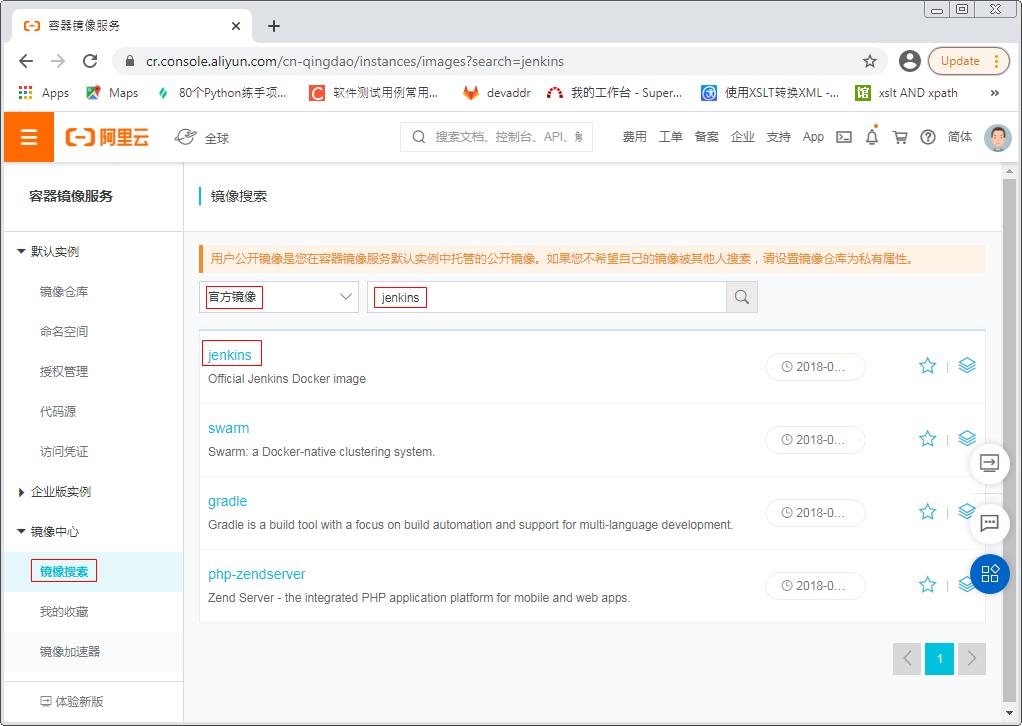
因为Jenkins镜像没有latest版本, 所以在pull的时候需要跟tag号
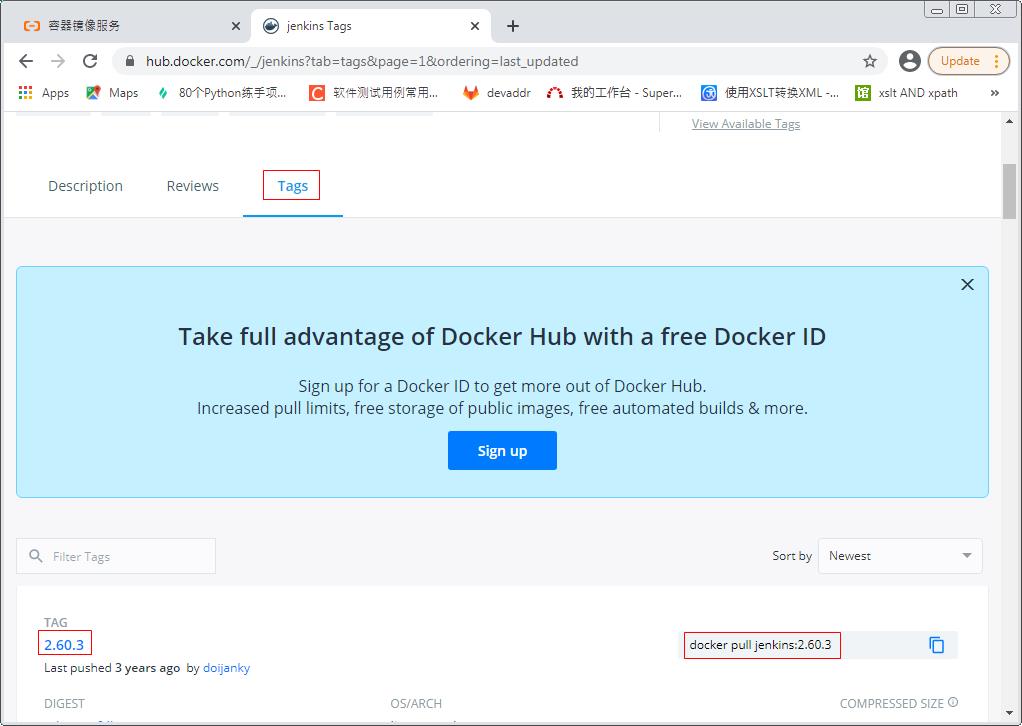
[root@localhost opt]# docker pull jenkins:2.60.3
2.60.3: Pulling from library/jenkins
55cbf04beb70: Pull complete
1607093a898c: Pull complete
9a8ea045c926: Pull complete
d4eee24d4dac: Pull complete
c58988e753d7: Pull complete
794a04897db9: Pull complete
70fcfa476f73: Pull complete
0539c80a02be: Pull complete
54fefc6dcf80: Pull complete
911bc90e47a8: Pull complete
38430d93efed: Pull complete
7e46ccda148a: Pull complete
c0cbcb5ac747: Pull complete
35ade7a86a8e: Pull complete
aa433a6a56b1: Pull complete
841c1dd38d62: Pull complete
b865dcb08714: Pull complete
5a3779030005: Pull complete
12b47c68955c: Pull complete
1322ea3e7bfd: Pull complete
Digest: sha256:eeb4850eb65f2d92500e421b430ed1ec58a7ac909e91f518926e02473904f668
Status: Downloaded newer image for jenkins:2.60.3
docker.io/library/jenkins:2.60.3
[root@localhost opt]#
[root@localhost opt]# docker images
REPOSITORY    TAG       IMAGE ID       CREATED         SIZE
hello-world   latest    bf756fb1ae65   14 months ago   13.3kB
jenkins       2.60.3    cd14cecfdb3a   2 years ago     696MB
[root@localhost opt]#
Docker常用命令
- docker images: 查看已安装的docker镜像
- docker image rm
: 删除镜像 - docker pull [OPTIONS] NAME[:TAG|@DIGEST]: 获取镜像
- docker search: 从仓库搜索镜像
- docker exec –it
bash : 进入docker容器内部 - docker run: 运行docker镜像
- docker ps: 查看运行容器进程
- docker run –d: 在后台运行docker镜像
- docker run –p 3306:3306: 端口映射
- docker stop
:停止正在运行的容器
将容器中的数据目录挂载到宿主机
以Jenkins镜像为例
启动Jenkins镜像
[root@localhost local]# docker run -d --name jenkins -p 8080:8080 -p 50000:50000 jenkins:2.60.3
825cd4485f22ac775f224dbbc4cab69b59b79cb812ed511bdb318f6ab7f9233f
[root@localhost local]#
将容器中的/var/jenkins_home/userContent目录复制到宿主机中/usr/local/jenkins/userContent
[root@localhost local]# mkdir /usr/local/jenkins
[root@localhost local]# docker cp jenkins:/var/jenkins_home/userContent /usr/local/jenkins/userContent
[root@localhost local]# ls -al /usr/local/jenkins/
total 0
drwxr-xr-x   3 root root  25 Mar 10 10:20 .
drwxr-xr-x. 13 root root 146 Mar 10 10:19 ..
drwxr-xr-x   2 root root  24 Mar 10 10:14 userContent
[root@localhost local]#
停止前面运行的容器
[root@localhost local]# docker ps
CONTAINER ID   IMAGE            COMMAND                  CREATED         STATUS         PORTS                                              NAMES
825cd4485f22   jenkins:2.60.3   "/bin/tini -- /usr/l…"   8 minutes ago   Up 8 minutes   0.0.0.0:8080->8080/tcp, 0.0.0.0:50000->50000/tcp   jenkins
[root@localhost local]# docker stop 825cd4485f22
825cd4485f22
[root@localhost local]#
再次运行容器, 添加挂载命令
[root@localhost local]# docker run -d --name jenkins -p 8080:8080 -p 50000:50000 -v /usr/local/jenkins/userContent:/var/jenkins_home/userContent jenkins:2.60.3
docker: Error response from daemon: Conflict. The container name "/jenkins" is already in use by container "825cd4485f22ac775f224dbbc4cab69b59b79cb812ed511bdb318f6ab7f9233f". You have to remove (or rename) that container to be able to reuse that name.
See 'docker run --help'.
[root@localhost local]# docker rm -f jenkins
jenkins
[root@localhost local]#
[root@localhost local]#
[root@localhost local]# docker run -d --name jenkins -p 8080:8080 -p 50000:50000 -v /usr/local/jenkins/userContent:/var/jenkins_home/userContent jenkins:2.60.3
17755738c01e84d00ac25eeee06582111e52f8a2f283deb068aa92b827fd7535
[root@localhost local]#
确认挂载成功, 修改宿主机的/usr/local/jenkins/userContent/目录中的readme.txt文件, 查看容器中文件是否被修改
[root@localhost local]# cd /usr/local/jenkins/userContent/
[root@localhost userContent]# ls -al
total 4
drwxr-xr-x 2 root root 24 Mar 10 10:14 .
drwxr-xr-x 3 root root 25 Mar 10 10:20 ..
-rw-r--r-- 1 root root 82 Mar 10 10:14 readme.txt
[root@localhost userContent]# cat readme.txt
Files in this directory will be served under your http://yourjenkins/userContent/
[root@localhost userContent]# echo ============= >> readme.txt
[root@localhost userContent]# cat readme.txt
Files in this directory will be served under your http://yourjenkins/userContent/
=============
[root@localhost userContent]# docker ps
CONTAINER ID   IMAGE            COMMAND                  CREATED              STATUS              PORTS                                              NAMES
17755738c01e   jenkins:2.60.3   "/bin/tini -- /usr/l…"   About a minute ago   Up About a minute   0.0.0.0:8080->8080/tcp, 0.0.0.0:50000->50000/tcp   jenkins
[root@localhost userContent]# docker exec -it 17755738c01e bash
jenkins@17755738c01e:/$ cd /var/jenkins_home/userContent/
jenkins@17755738c01e:~/userContent$ ls -al
total 8
drwxr-xr-x  2 root    root      24 Mar 10 02:14 .
drwxr-xr-x 13 jenkins jenkins 4096 Mar 10 02:27 ..
-rw-r--r--  1 root    root      96 Mar 10 02:27 readme.txt
jenkins@17755738c01e:~/userContent$ cat readme.txt
Files in this directory will be served under your http://yourjenkins/userContent/
=============
jenkins@17755738c01e:~/userContent$
使用registry镜像创建本地仓库
拉取registry镜像
[root@localhost ~]# docker pull registry
Using default tag: latest
latest: Pulling from library/registry
0a6724ff3fcd: Pull complete
d550a247d74f: Pull complete
1a938458ca36: Pull complete
acd758c36fc9: Pull complete
9af6d68b484a: Pull complete
Digest: sha256:d5459fcb27aecc752520df4b492b08358a1912fcdfa454f7d2101d4b09991daa
Status: Downloaded newer image for registry:latest
docker.io/library/registry:latest
[root@localhost ~]#
[root@localhost ~]# docker images
REPOSITORY   TAG       IMAGE ID       CREATED        SIZE
registry     latest    678dfa38fcfa   2 months ago   26.2MB
在/usr/lib/systemd/system/docker.service文件的ExecStart字段中增加–insecure-registry <ip>:5000配置, 其中<ip>为当前系统的IP地址
[root@localhost ~]# cat /usr/lib/systemd/system/docker.service
[Unit]
Description=Docker Application Container Engine
Documentation=https://docs.docker.com
After=network-online.target firewalld.service containerd.service
Wants=network-online.target
Requires=docker.socket containerd.service

[Service]
Type=notify
# the default is not to use systemd for cgroups because the delegate issues still
# exists and systemd currently does not support the cgroup feature set required
# for containers run by docker
ExecStart=/usr/bin/dockerd -H fd:// --containerd=/run/containerd/containerd.sock --insecure-registry 172.20.3.139:5000
ExecReload=/bin/kill -s HUP $MAINPID
TimeoutSec=0
RestartSec=2
Restart=always

# Note that StartLimit* options were moved from "Service" to "Unit" in systemd 229.
# Both the old, and new location are accepted by systemd 229 and up, so using the old location
# to make them work for either version of systemd.
StartLimitBurst=3

# Note that StartLimitInterval was renamed to StartLimitIntervalSec in systemd 230.
# Both the old, and new name are accepted by systemd 230 and up, so using the old name to make
# this option work for either version of systemd.
StartLimitInterval=60s

# Having non-zero Limit*s causes performance problems due to accounting overhead
# in the kernel. We recommend using cgroups to do container-local accounting.
LimitNOFILE=infinity
LimitNPROC=infinity
LimitCORE=infinity

# Comment TasksMax if your systemd version does not support it.
# Only systemd 226 and above support this option.
TasksMax=infinity

# set delegate yes so that systemd does not reset the cgroups of docker containers
Delegate=yes

# kill only the docker process, not all processes in the cgroup
KillMode=process
OOMScoreAdjust=-500

[Install]
WantedBy=multi-user.target
[root@localhost ~]#
重启docker服务
[root@localhost ~]# systemctl daemon-reload
[root@localhost ~]# systemctl restart docker
运行容器
[root@localhost ~]# mkdir /usr/local/registry
[root@localhost ~]#
[root@localhost ~]# docker run -d -p 5000:5000 -v /usr/local/registry:/var/lib/registry registry
2e58f8e33125403ea814bd6b3f67912d7512bb673ed3c552953059b75ac4c6f1
[root@localhost ~]#
[root@localhost ~]# docker ps
CONTAINER ID   IMAGE      COMMAND                  CREATED         STATUS         PORTS                    NAMES
2e58f8e33125   registry   "/entrypoint.sh /etc…"   4 seconds ago   Up 3 seconds   0.0.0.0:5000->5000/tcp   agitated_kalam
拉取一个Jenkins容器
[root@localhost ~]# docker pull jenkins:2.60.3
2.60.3: Pulling from library/jenkins
55cbf04beb70: Pull complete
1607093a898c: Pull complete
9a8ea045c926: Pull complete
d4eee24d4dac: Pull complete
c58988e753d7: Pull complete
794a04897db9: Pull complete
70fcfa476f73: Pull complete
0539c80a02be: Pull complete
54fefc6dcf80: Pull complete
911bc90e47a8: Pull complete
38430d93efed: Pull complete
7e46ccda148a: Pull complete
c0cbcb5ac747: Pull complete
35ade7a86a8e: Pull complete
aa433a6a56b1: Pull complete
841c1dd38d62: Pull complete
b865dcb08714: Pull complete
5a3779030005: Pull complete
12b47c68955c: Pull complete
1322ea3e7bfd: Pull complete
Digest: sha256:eeb4850eb65f2d92500e421b430ed1ec58a7ac909e91f518926e02473904f668
Status: Downloaded newer image for jenkins:2.60.3
docker.io/library/jenkins:2.60.3
[root@localhost ~]#
[root@localhost ~]# docker images
REPOSITORY   TAG       IMAGE ID       CREATED        SIZE
registry     latest    678dfa38fcfa   2 months ago   26.2MB
jenkins      2.60.3    cd14cecfdb3a   2 years ago    696MB
[root@localhost ~]#
在本地host上, 重命名镜像, 上传到本地仓库中, 添加新的tag, 使之与registry相匹配
[root@localhost ~]# docker tag jenkins:2.60.3 172.20.3.139:5000/jenkins_test
[root@localhost ~]# docker images
REPOSITORY                       TAG       IMAGE ID       CREATED        SIZE
registry                         latest    678dfa38fcfa   2 months ago   26.2MB
172.20.3.139:5000/jenkins_test   latest    cd14cecfdb3a   2 years ago    696MB
jenkins                          2.60.3    cd14cecfdb3a   2 years ago    696MB
[root@localhost ~]#
[root@localhost ~]# docker push 172.20.3.139:5000/jenkins_test
Using default tag: latest
The push refers to repository [172.20.3.139:5000/jenkins_test]
0577e068c587: Pushed
b1891bf16fa7: Pushed
37c1d818eb0b: Pushed
d51e4482f53a: Pushed
ceed640cbb93: Pushed
047f9c957a2e: Pushed
1db731634011: Pushed
a0775f499ef1: Pushed
c19390bb619a: Pushed
6ff38243bfb8: Pushed
9fe468dbb76f: Pushed
571ae0d6961a: Pushed
518c9e7eb326: Pushed
c3ebb2aa7787: Pushed
9c2e8b91bfa8: Pushed
c477b6c8ca45: Pushed
fa0c3f992cbd: Pushed
ce6466f43b11: Pushed
719d45669b35: Pushed
3b10514a95be: Pushed
latest: digest: sha256:0de43cde2c4b864a8e4a84bbd9958e47c5d851319f118203303d040b0a74f159 size: 4501
[root@localhost ~]#
删除本地镜像, 重新从本地仓库拉取
[root@localhost ~]# docker rmi 172.20.3.139:5000/jenkins_test:latest
Untagged: 172.20.3.139:5000/jenkins_test:latest
Untagged: 172.20.3.139:5000/jenkins_test@sha256:0de43cde2c4b864a8e4a84bbd9958e47c5d851319f118203303d040b0a74f159
[root@localhost ~]#
[root@localhost ~]# docker images
REPOSITORY   TAG       IMAGE ID       CREATED        SIZE
registry     latest    678dfa38fcfa   2 months ago   26.2MB
jenkins      2.60.3    cd14cecfdb3a   2 years ago    696MB
[root@localhost ~]#
[root@localhost ~]# docker pull 172.20.3.139:5000/jenkins_test
Using default tag: latest
latest: Pulling from jenkins_test
Digest: sha256:0de43cde2c4b864a8e4a84bbd9958e47c5d851319f118203303d040b0a74f159
Status: Downloaded newer image for 172.20.3.139:5000/jenkins_test:latest
172.20.3.139:5000/jenkins_test:latest
[root@localhost ~]# docker images
REPOSITORY                       TAG       IMAGE ID       CREATED        SIZE
registry                         latest    678dfa38fcfa   2 months ago   26.2MB
172.20.3.139:5000/jenkins_test   latest    cd14cecfdb3a   2 years ago    696MB
jenkins                          2.60.3    cd14cecfdb3a   2 years ago    696MB
[root@localhost ~]#
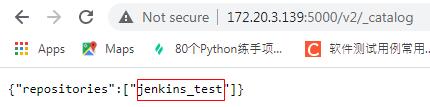
可以在浏览器中访问http://172.20.3.139:5000/v2/_catalog查看镜像上传日志
Jenkins中的slave使用docker
配置docker服务器
在/usr/lib/systemd/system/docker.service文件中的ExecStart增加”-H tcp://0.0.0.0:2375”
ExecStart=/usr/bin/dockerd -H tcp://0.0.0.0:2375 -H fd:// --containerd=/run/containerd/containerd.sock
然后重启服务
systemctl daemon-reload
systemctl restart docker
jenkins安装Docker plugin插件
Manage Jenkins -> Configure System -> Cloud 配置docker slave
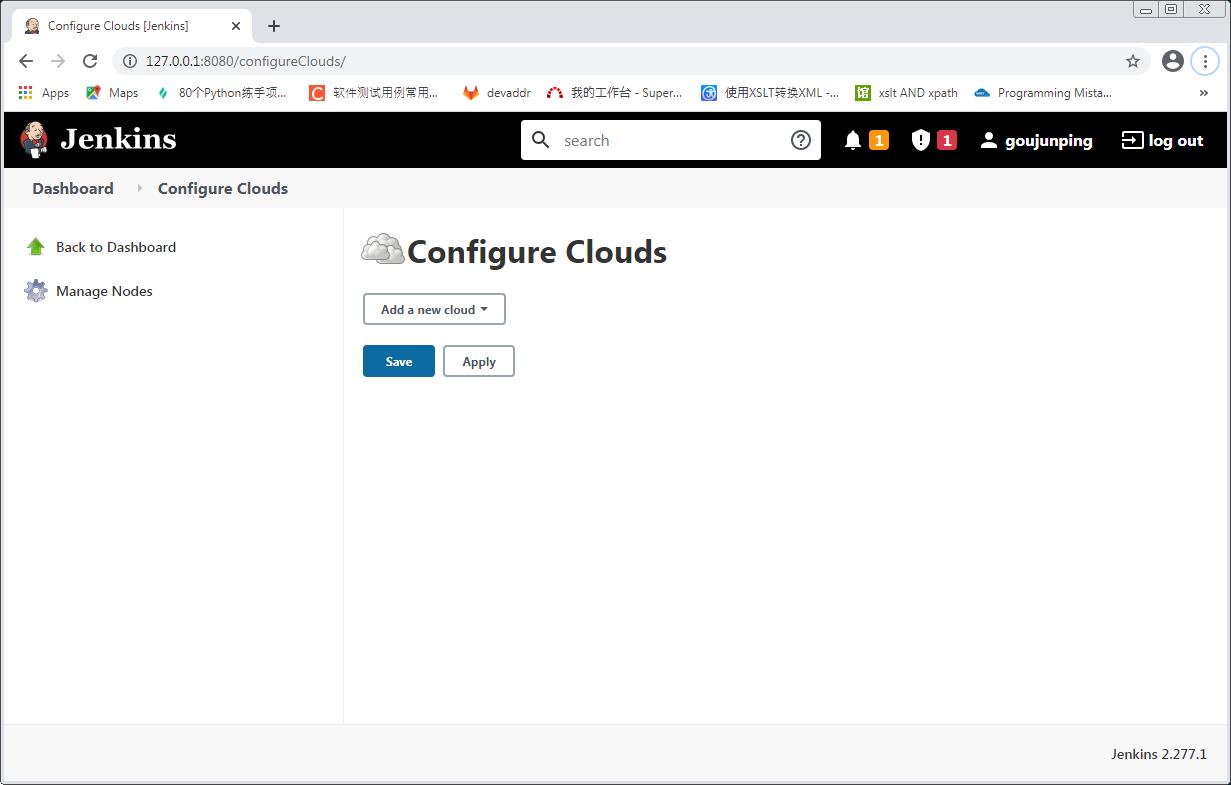
Add a new cloud -> Docker

配置docker cloud
- Docker Host URI: 配置为tcp://172.20.3.139:2375, 其中的IP为docker服务器的IP, 端口为步骤1中配置的端口
- 点击Test Connection: 测试是否能连接成功, 连接成功后会显示docker服务器的版本
- Enable需要勾选
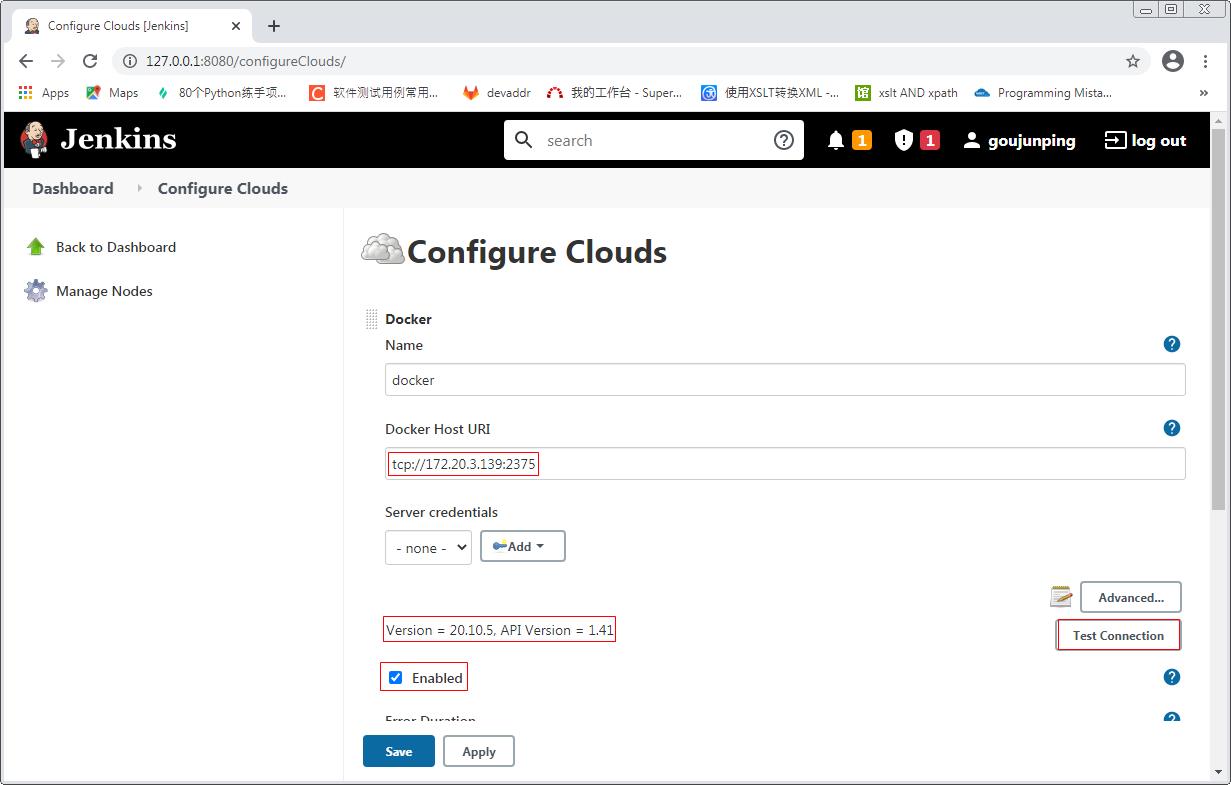
- 其他配置使用默认值
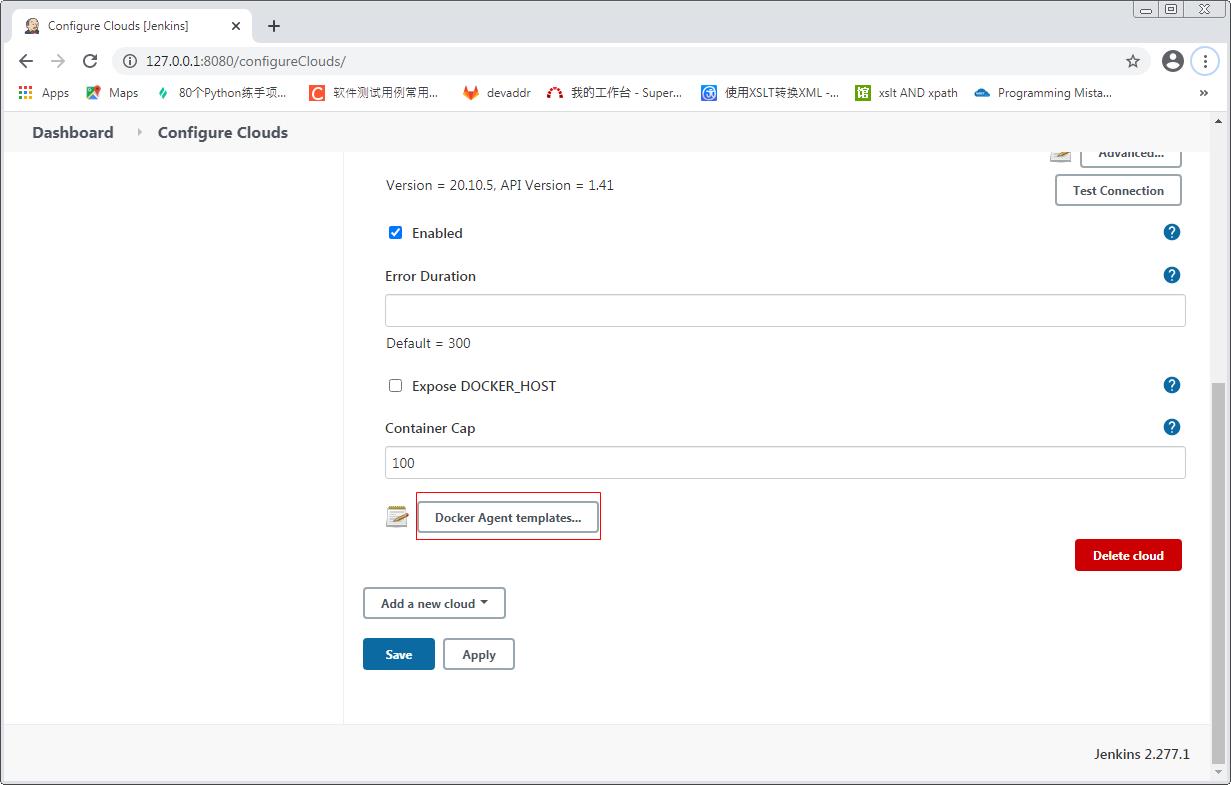
- 点击Docker Agent templates… -> Add Docker Template
- Labels: 配置docker salve的标签, 在配置Job的时候需要指定这个label
- Enable需要勾选
- Name: 随便指定
- Docker Image: 镜像名称jenkins/ssh-slave:latest, 第一次连接的时候, 如果服务器中没有这个镜像, 则会自动去仓库下载, 目前该镜像测试能正常运行
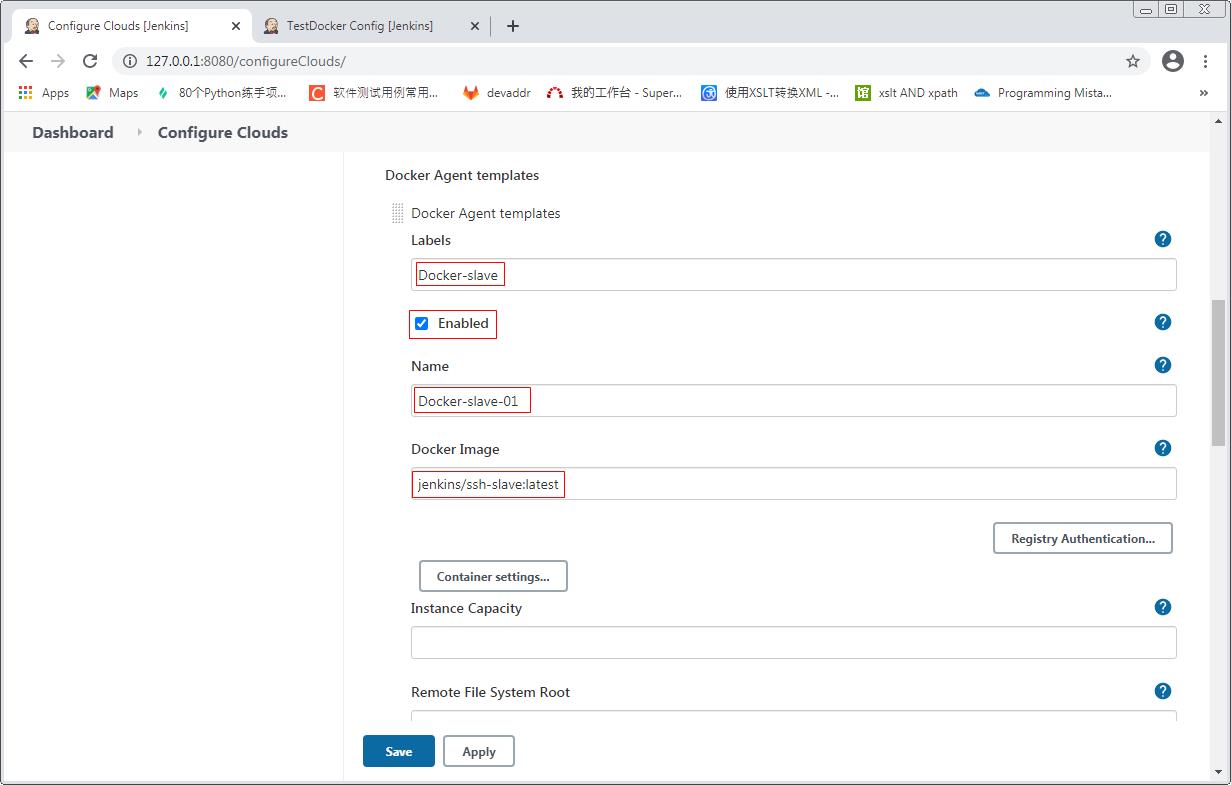
- Remote File System Root: 设置slave中工作根目录为/home/jenkins
- Usage: 选择Use this node as much as possible
- Connect method: 选择连接方式为Connect with SSH
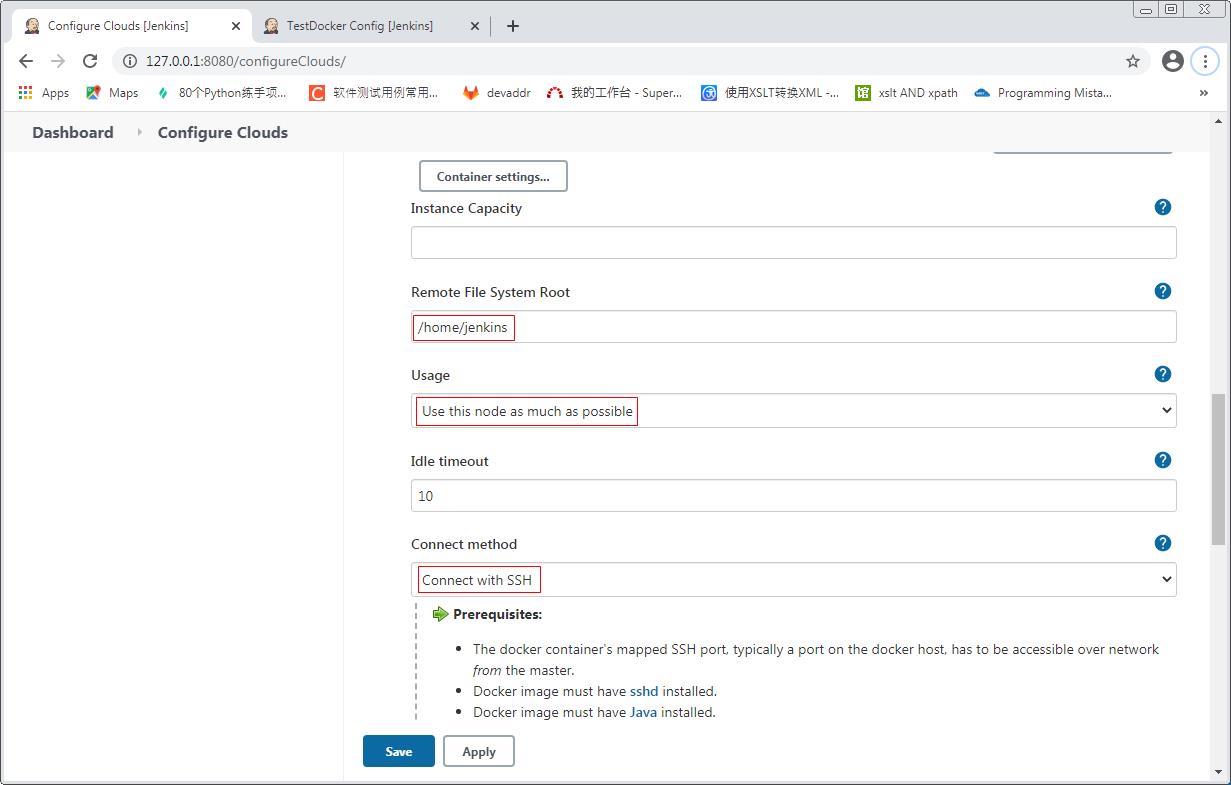
- SSH key: 选择Inject SSH key
- User: 设置为jenkins, 目前测试该用户名能正常连接
- Pull strategy: pull镜像策略选择Pull once and update latest
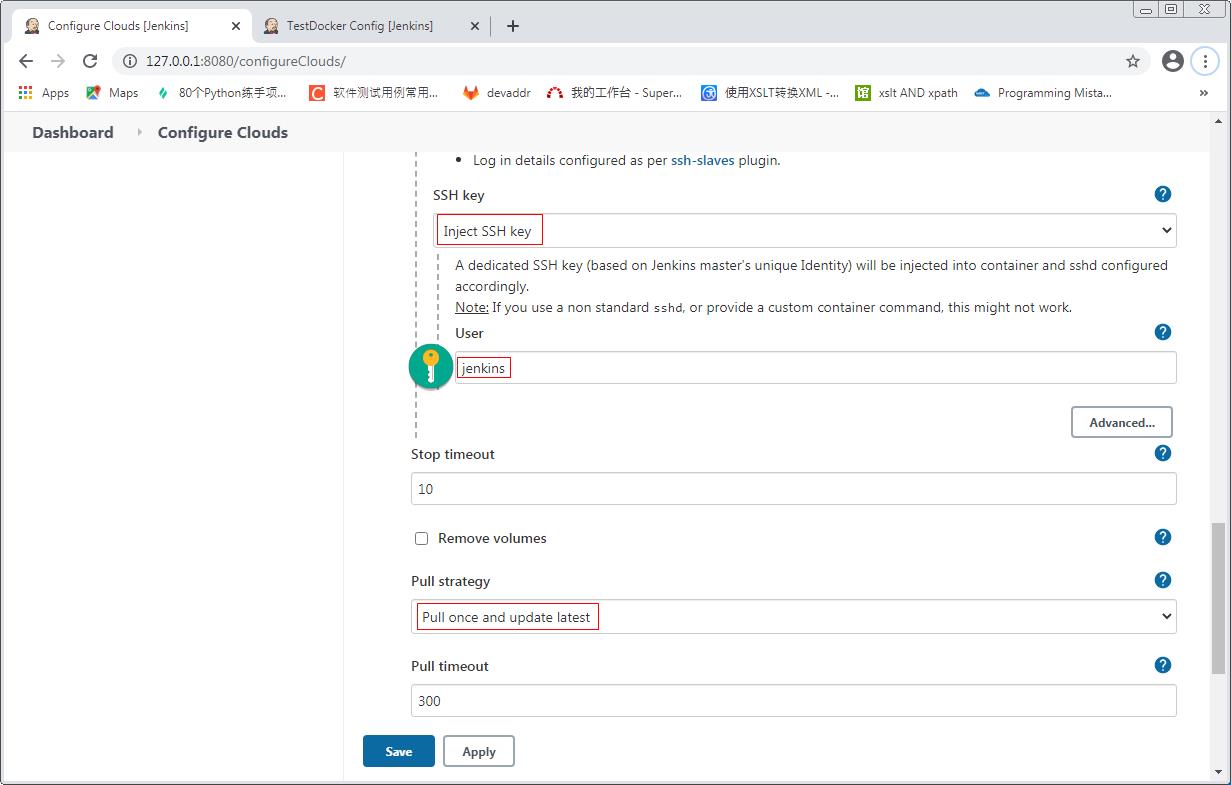
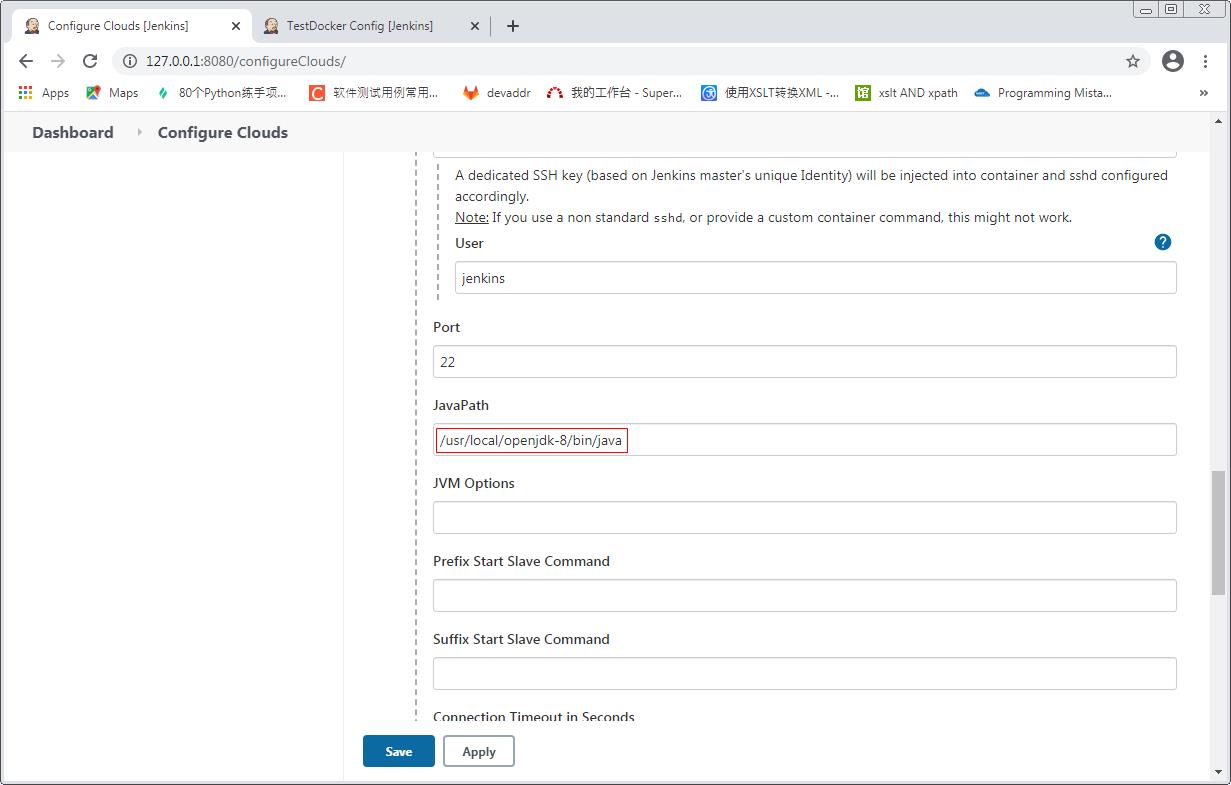
- 点击Advanced… -> 配置JavaPath为/usr/local/openjdk-8/bin/java, 如果不配置Java路径, 则在连接docker的时候会默认去PATH环境变量的路径去查找, 如果查找不到则会连接失败
配置JOB时使用Docker
- New Item -> 输入Job名TestDocker -> 选择Freestyle project
- 勾选Restrict where this project can be run, 并在Label Expression中设置Docker-slave, 该label就是在上一步配置cloud的时候设置的
- 配置build步骤
- 保存
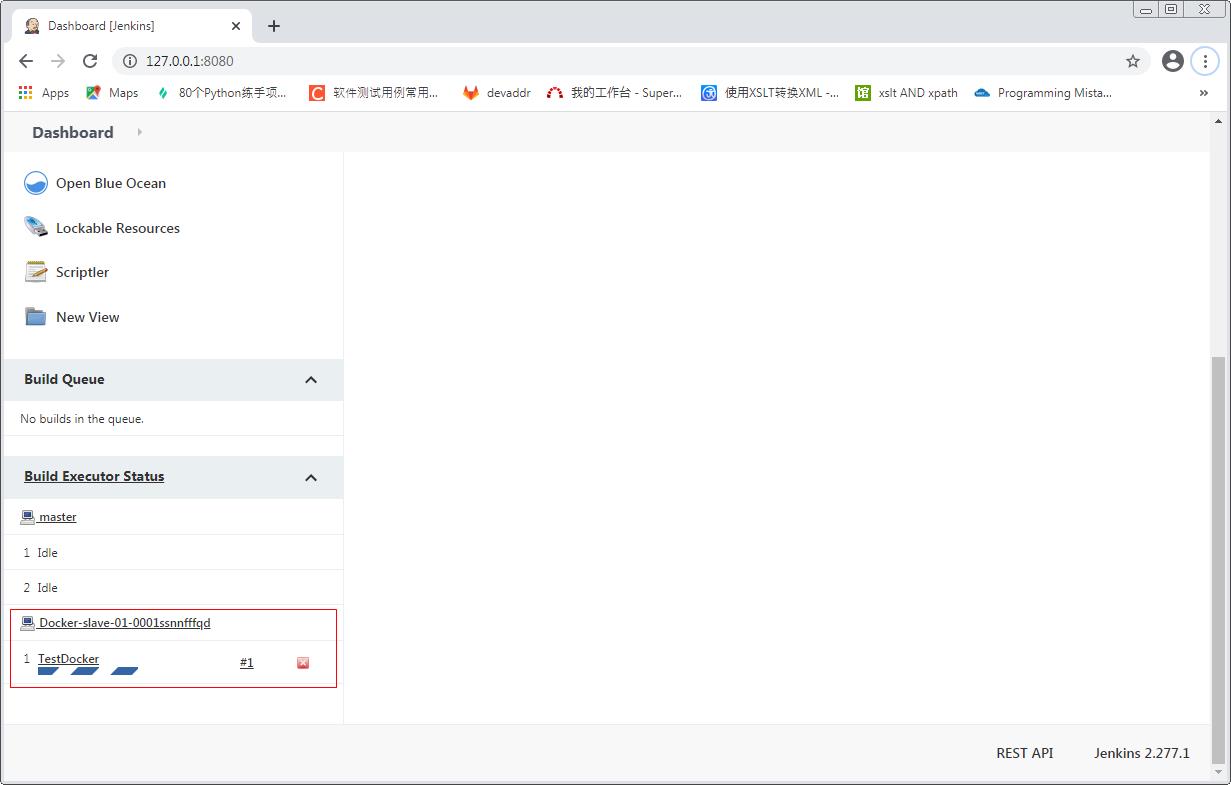
执行上一步新建的Job, 可以看到任务在新建的docker容器上运行
去docker服务器上查看docker容器
[root@localhost ~]# docker images
REPOSITORY          TAG       IMAGE ID       CREATED         SIZE
jenkins/ssh-slave   latest    fb7b3847769f   11 months ago   514MB
[root@localhost ~]# docker ps
CONTAINER ID   IMAGE                      COMMAND                  CREATED         STATUS         PORTS                   NAMES
28c75644378b   jenkins/ssh-slave:latest   "setup-sshd /usr/sbi…"   2 minutes ago   Up 2 minutes   0.0.0.0:49198->22/tcp   silly_volhard
[root@localhost ~]# docker exec -it 28c75644378b bash
root@28c75644378b:/home/jenkins# ls -al
total 1484
drwxr-xr-x 5 jenkins jenkins     124 Mar 18 02:54 .
drwxr-xr-x 1 root    root         21 Apr 13  2020 ..
-rw-r--r-- 1 jenkins jenkins     220 Apr 18  2019 .bash_logout
-rw-r--r-- 1 jenkins jenkins    3526 Apr 18  2019 .bashrc
drwxr-xr-x 3 jenkins jenkins      17 Mar 18 02:54 .cache
-rw-r--r-- 1 jenkins jenkins     807 Apr 18  2019 .profile
drwxr-xr-x 4 jenkins jenkins      34 Mar 18 02:54 remoting
-rw-r--r-- 1 jenkins jenkins 1506923 Mar 18 02:54 remoting.jar
drwxr-xr-x 3 jenkins jenkins      24 Mar 18 02:54 workspace
root@28c75644378b:/home/jenkins#
Jenkins中的slave使用基于Centos7, 并且安装自定义软件的docker容器
搭建好本地仓库, 拉取Centos7官方镜像
[root@localhost ~]# docker ps
CONTAINER ID   IMAGE      COMMAND                  CREATED          STATUS          PORTS                    NAMES
ffd0d6d11c11   registry   "/entrypoint.sh /etc…"   25 minutes ago   Up 25 minutes   0.0.0.0:5000->5000/tcp   lucid_agnesi
[root@localhost ~]# docker images
REPOSITORY   TAG       IMAGE ID       CREATED        SIZE
registry     latest    678dfa38fcfa   3 months ago   26.2MB
[root@localhost ~]# docker pull centos:7
7: Pulling from library/centos
2d473b07cdd5: Pull complete
Digest: sha256:0f4ec88e21daf75124b8a9e5ca03c37a5e937e0e108a255d890492430789b60e
Status: Downloaded newer image for centos:7
docker.io/library/centos:7
[root@localhost ~]# docker images
REPOSITORY   TAG       IMAGE ID       CREATED        SIZE
registry     latest    678dfa38fcfa   3 months ago   26.2MB
centos       7         8652b9f0cb4c   4 months ago   204MB
[root@localhost ~]#
用centos7镜像启动容器
启动命令需要带参数-it, –privileged=true, /sbin/init, 否则后面无法启动SSH服务
[root@localhost ~]# docker run -it -d --privileged=true -p 6000:5000 centos:7 /sbin/init
3babe3df6154f5ea1dbbf5f3ef4e70c417cbd91e32b732a40cada01cf10a68c7
[root@localhost ~]# docker ps
CONTAINER ID   IMAGE      COMMAND                  CREATED          STATUS          PORTS                    NAMES
3babe3df6154   centos:7   "/sbin/init"             5 seconds ago    Up 5 seconds    0.0.0.0:6000->5000/tcp   distracted_lehmann
ffd0d6d11c11   registry   "/entrypoint.sh /etc…"   30 minutes ago   Up 30 minutes   0.0.0.0:5000->5000/tcp   lucid_agnesi
[root@localhost ~]# docker exec -it 3babe3df6154 bash
[root@3babe3df6154 /]#
安装java, ssh服务, 以及其他一些相关工具
yum list java*
yum -y install java-1.8.0-openjdk
yum -y install openssh-server openssh-clients
yum -y install net-tools vim
启动ssh服务
[root@3babe3df6154 /]# systemctl status sshd.service
● sshd.service - OpenSSH server daemon
   Loaded: loaded (/usr/lib/systemd/system/sshd.service; enabled; vendor preset: enabled)
   Active: inactive (dead)
     Docs: man:sshd(8)
           man:sshd_config(5)
[root@3babe3df6154 /]# systemctl start sshd.service
[root@3babe3df6154 /]# systemctl status sshd.service
● sshd.service - OpenSSH server daemon
   Loaded: loaded (/usr/lib/systemd/system/sshd.service; enabled; vendor preset: enabled)
   Active: active (running) since Fri 2021-03-19 08:04:41 UTC; 2s ago
     Docs: man:sshd(8)
           man:sshd_config(5)
 Main PID: 366 (sshd)
   CGroup: /docker/3babe3df6154f5ea1dbbf5f3ef4e70c417cbd91e32b732a40cada01cf10a68c7/system.slice/sshd.service
           └─366 /usr/sbin/sshd -D
           ‣ 366 /usr/sbin/sshd -D

Mar 19 08:04:41 3babe3df6154 systemd[1]: Starting OpenSSH server daemon...
Mar 19 08:04:41 3babe3df6154 sshd[366]: Server listening on 0.0.0.0 port 22.
Mar 19 08:04:41 3babe3df6154 sshd[366]: Server listening on :: port 22.
Mar 19 08:04:41 3babe3df6154 systemd[1]: Started OpenSSH server daemon.
[root@3babe3df6154 /]# systemctl enable sshd.service
[root@3babe3df6154 /]# netstat -tlunp
Active Internet connections (only servers)
Proto Recv-Q Send-Q Local Address           Foreign Address         State       PID/Program name
tcp        0      0 0.0.0.0:22              0.0.0.0:*               LISTEN      366/sshd
tcp6       0      0 :::22                   :::*                    LISTEN      366/sshd
[root@3babe3df6154 /]#
基于前面修改的容器创建镜像, 镜像名jenkins-slave
[root@localhost ~]# docker commit 3babe3df6154 jenkins-slave
sha256:618aba88f6358836bdbd8013bbc9ec4ae17260dfe3a1463fb501d9ee0d26724e
[root@localhost ~]# docker images
REPOSITORY      TAG       IMAGE ID       CREATED         SIZE
jenkins-slave   latest    618aba88f635   2 minutes ago   570MB
registry        latest    678dfa38fcfa   3 months ago    26.2MB
centos          7         8652b9f0cb4c   4 months ago    204MB
将镜像上传到本地仓库, 然后删除本地原始镜像
[root@localhost ~]# docker tag jenkins-slave:latest 172.20.3.139:5000/jenkins-slave
[root@localhost ~]# docker push 172.20.3.139:5000/jenkins-slave
Using default tag: latest
The push refers to repository [172.20.3.139:5000/jenkins-slave]
f2308b611323: Pushed
174f56854903: Pushed
latest: digest: sha256:9f491d52e0d9e00d5b4458b2388bd68de06c243a197206b1ac56608433d8c737 size: 742
[root@localhost ~]# docker rmi jenkins-slave
Untagged: jenkins-slave:latest
[root@localhost ~]# docker rmi 172.20.3.139:5000/jenkins-slave
Untagged: 172.20.3.139:5000/jenkins-slave:latest
Untagged: 172.20.3.139:5000/jenkins-slave@sha256:9f491d52e0d9e00d5b4458b2388bd68de06c243a197206b1ac56608433d8c737
Deleted: sha256:618aba88f6358836bdbd8013bbc9ec4ae17260dfe3a1463fb501d9ee0d26724e
Deleted: sha256:ccbafe7b80db22222059388be68df054ec1c5b99919769e69ff469141bbfa363
[root@localhost ~]# docker images
REPOSITORY   TAG       IMAGE ID       CREATED        SIZE
registry     latest    678dfa38fcfa   3 months ago   26.2MB
centos       7         8652b9f0cb4c   4 months ago   204MB
[root@localhost ~]#
修改Jenkins中Docker的配置
修改镜像名
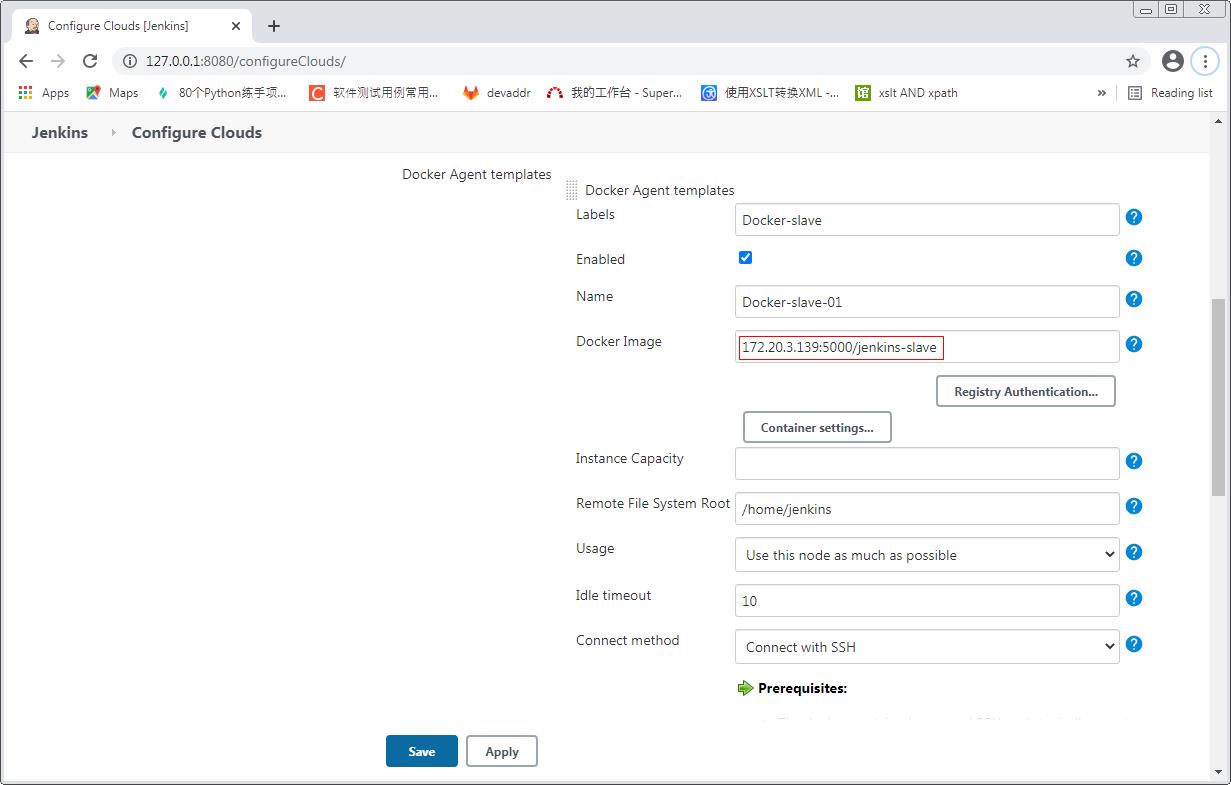
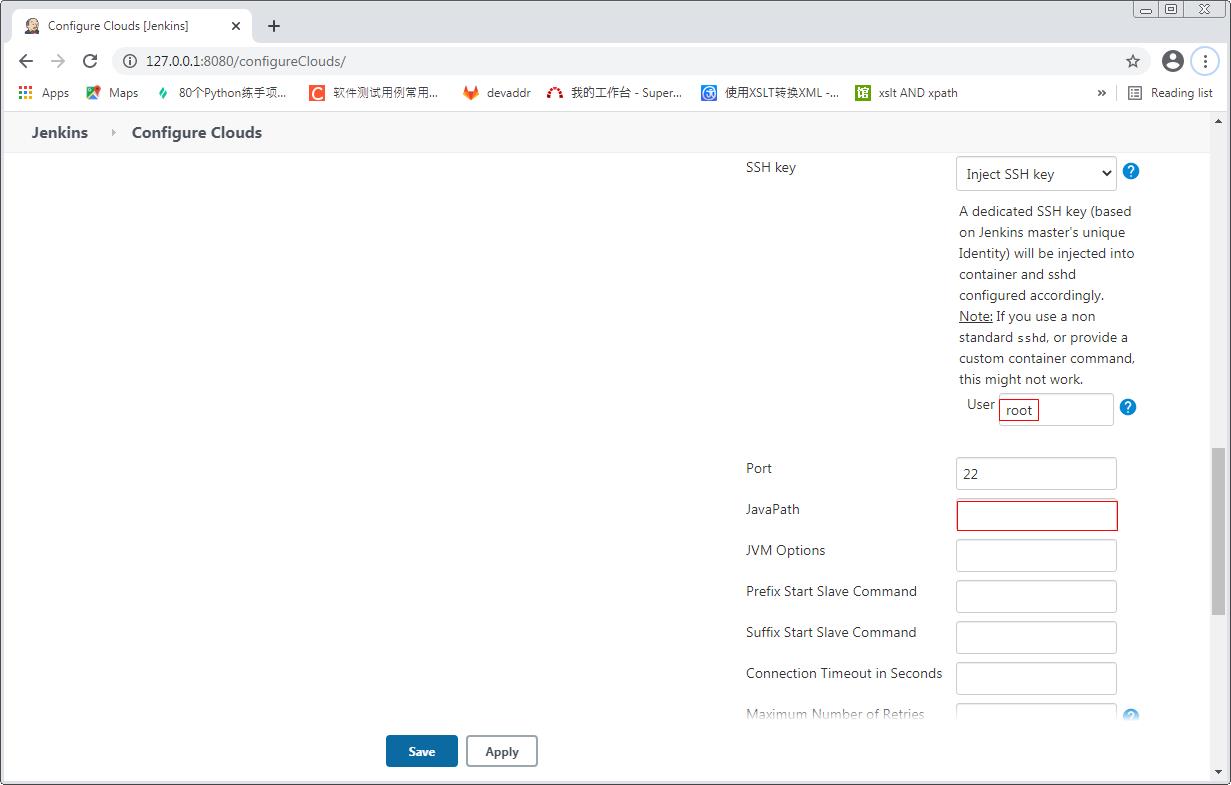
修改用户名为root; 创建了jenkins用户, 但是容器创建好后登录失败, 后续再研究; 另外JavaPath不需要配置, 因为在前面安装Java, 会自动安装到PATH环境变量所在的路径
在Job中直接调度即可, Job运行的时候可以直接在docker服务器上看到下载的镜像和运行的容器
[root@localhost ~]# docker images
REPOSITORY                        TAG       IMAGE ID       CREATED         SIZE
172.20.3.139:5000/jenkins-slave   latest    618aba88f635   9 minutes ago   570MB
registry                          latest    678dfa38fcfa   3 months ago    26.2MB
centos                            7         8652b9f0cb4c   4 months ago    204MB
[root@localhost ~]# docker ps
CONTAINER ID   IMAGE                             COMMAND                  CREATED          STATUS          PORTS                             NAMES
31f52a6e20bc   172.20.3.139:5000/jenkins-slave   "/usr/sbin/sshd -D -…"   20 seconds ago   Up 18 seconds   5000/tcp, 0.0.0.0:49193->22/tcp   modest_shockley
ffd0d6d11c11   registry                          "/entrypoint.sh /etc…"   55 minutes ago   Up 55 minutes   0.0.0.0:5000->5000/tcp            lucid_agnesi
[root@localhost ~]#
Docker官方链接: https://docs.docker.com/